


Home » Unattended Payment Solutions: How They Work & How to Set Them Up

Unattended Payment Solutions: How They Work & How to Set Them Up
| September 14, 2026
Customers love convenience. And what’s more convenient in a retail environment than being able to pay without waiting in line or for an employee.
From vending machines and parking kiosks to EV chargers and self-service checkouts, unattended payment solutions make that possible by connecting self-service equipment directly to the payment infrastructure.
But accepting a card or mobile wallet without a cashier introduces requirements that do not exist in a typical checkout environment. The terminal, gateway, processor, machine software, connectivity, and transaction flow all need to work together reliably.
This guide explains how unattended payments work, what a typical setup includes, and steps for implementing these solutions at your place of business.
What are unattended payments?
Unattended payments are transactions completed at a self-service machine or terminal without an employee handling the payment. The customer interacts directly with a payment device to pay by card, contactless wallet, or another supported method.
Unattended payments are treated as card-present transactions, even though no employee is present. This is important as card-present and card-not-present transactions come with different processing rates, fraud risk, and merchant account requirements.
The payment terminal is typically built into or connected to equipment that delivers a product or service. Common examples include:
- Vending machines: Customers pay for snacks, drinks, electronics, or other products directly at the machine.
- Parking kiosks: Drivers pay for parking based on a fixed fee, selected duration, or calculated parking time.
- EV charging stations: Drivers authorize payment before or during charging, with the final charge often based on energy consumed or charging time.
- Fuel pumps: Customers authorize a card at the pump and pay based on the amount of fuel dispensed.
- Self-service checkouts: Shoppers scan products and complete payment without a cashier processing the transaction.
- Ticketing kiosks: Customers purchase transportation, entertainment, or event tickets through a self-service terminal.
- Car washes: Drivers select a wash package and pay before entering an automated or self-service wash bay.
- Laundry machines: Customers pay directly at commercial washers or dryers instead of using coins or paying an attendant.
- Locker systems: Users pay to rent storage lockers, parcel lockers, or other automated storage services.
- Toll and transportation systems: Travelers pay fares, tolls, or access fees through automated terminals or contactless readers.
- Photo booths and entertainment machines: Customers pay directly before using an automated photo booth, arcade machine, gaming terminal, or similar equipment.
- Donation kiosks: Charities, museums, religious organizations, and other institutions can accept card or contactless donations without staff processing each payment.
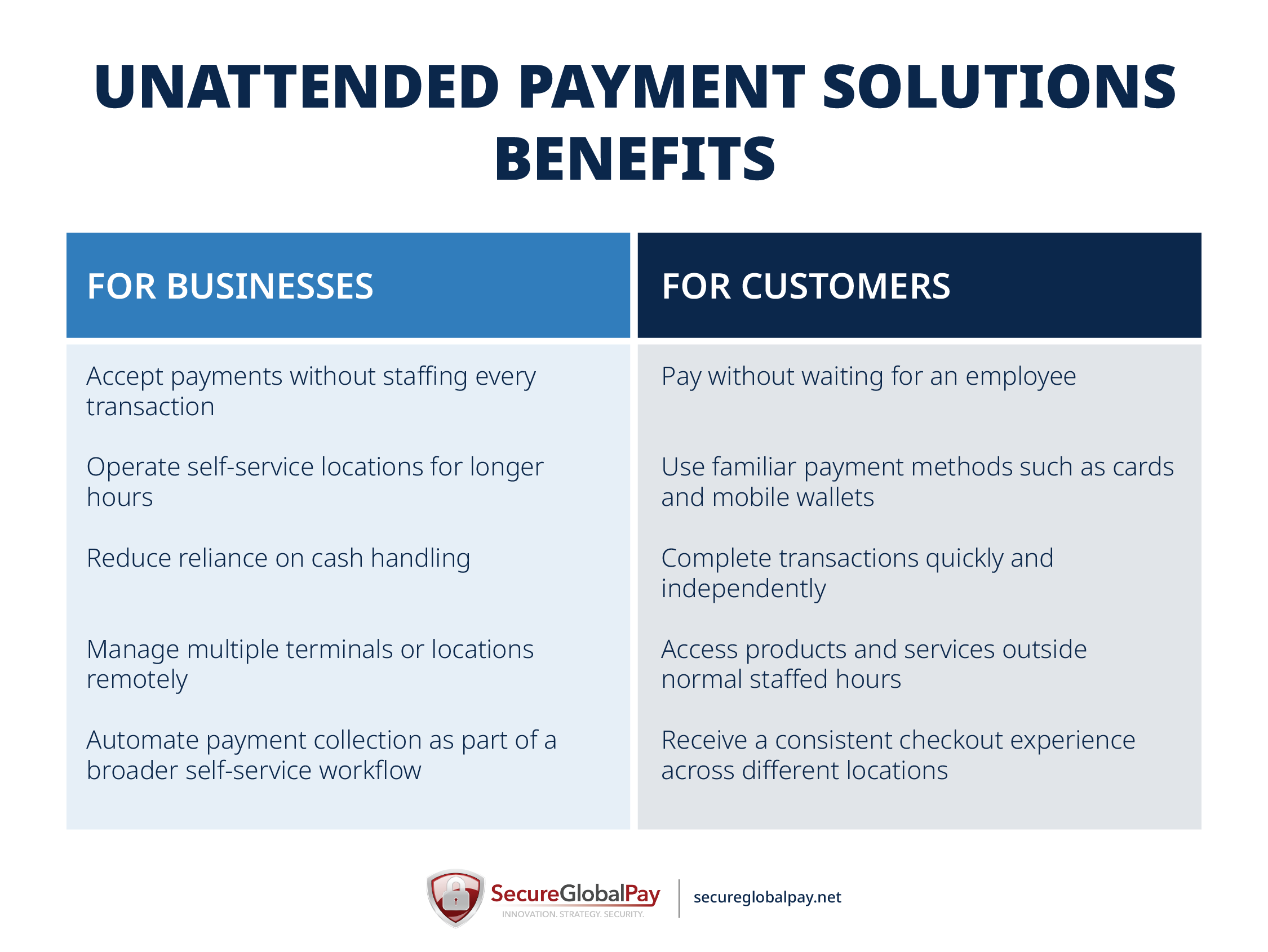
For businesses, unattended payments can support longer operating hours, reduce cash handling, and make it easier to operate across multiple locations. For customers, the main benefits are convenience and speed.
How unattended payment terminals work
An unattended payment terminal works much like a normal card terminal, just without the cashier. The terminal collects the customer’s payment information, sends the transaction for authorization, and tells the machine whether the payment was approved.
Consider a standard vending machine. From the customer’s perspective, the process looks like this:
- The customer selects a $3 drink.
- The vending machine displays the price and prompts the customer to pay.
- The customer taps a card or mobile wallet, or inserts a chip card.
- The terminal processes the payment request.
- If the transaction is approved, the vending machine dispenses the drink and confirms the purchase. If it is declined, the machine asks the customer to try another payment method.
Behind the scenes, several systems communicate within those few seconds:
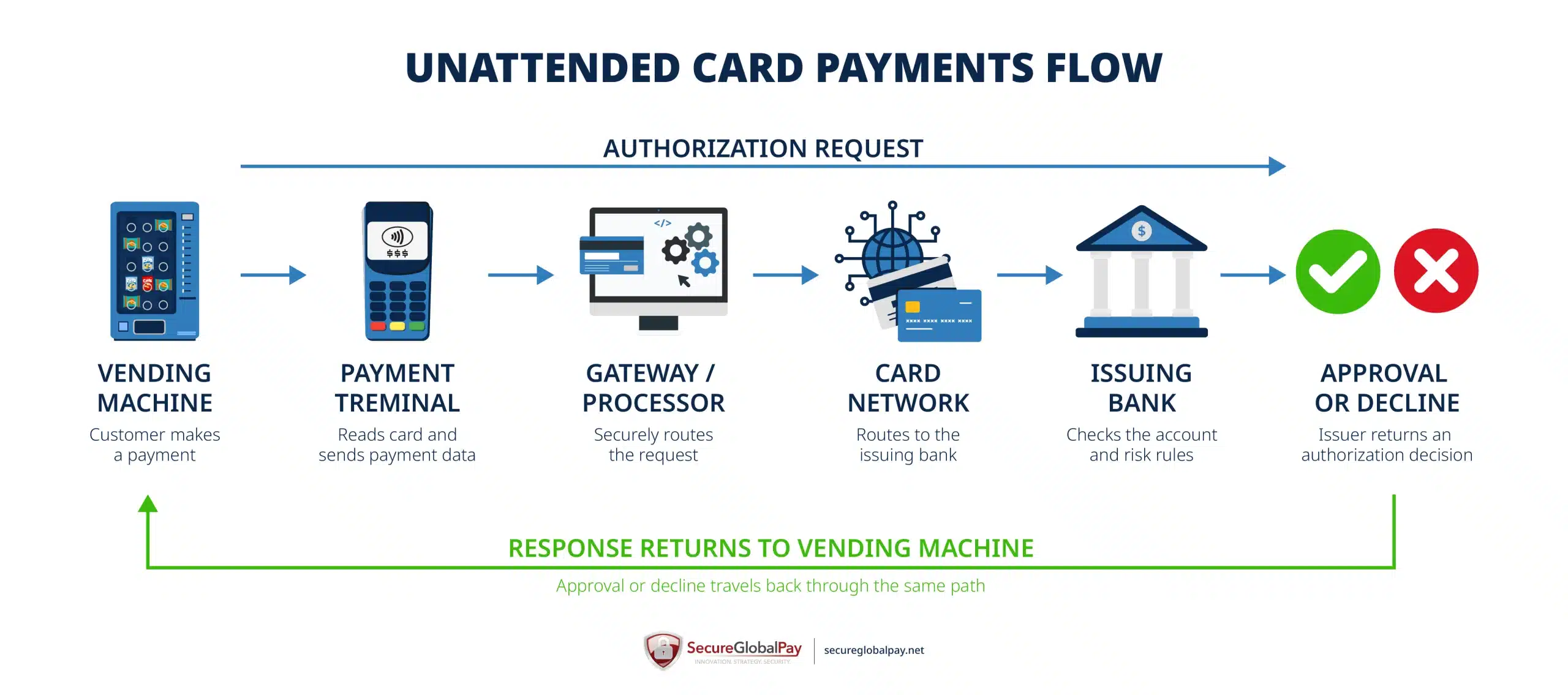
The machine or kiosk software first tells the payment terminal how much to charge. The terminal reads the customer’s payment credentials and sends the transaction through the payment provider’s infrastructure for authorization. The request ultimately reaches the bank that issued the customer’s card, which approves or declines the transaction and sends the response back through the payment chain.
For transactions where the final price is unknown at the start, the process can differ slightly. An EV charger, for example, may first place a preauthorization on the customer's card. Once the service is complete, the merchant submits the actual amount and releases the unused portion of the authorization.
What an unattended payment setup typically includes
An unattended payment solution usually combines:
- Payment terminal: The payment terminal is the physical device that accepts the customer’s payment. It may support chip cards, contactless cards, and mobile wallets, and in some cases it also includes a screen, PIN pad, or keypad.
- Kiosk or machine software: The kiosk or machine software controls the self-service experience and tells the terminal what to charge. It also receives the approval or decline result and decides what happens next, such as dispensing a product, starting a charging session, printing a ticket, or showing an error message.
- Payment gateway: The payment gateway often handles encryption, routing, transaction messaging, and communication between the terminal-side system and the processor or acquirer. The gateway is especially important when the payment terminal must integrate with custom kiosk software, a machine controller, or a vertical platform such as parking or EV charging software.
- Payment processor/acquirer: The processor or acquiring partner handles the transaction on the merchant side of the payment system. This part of the setup helps move the authorization request through the necessary payment networks and supports settlement of approved transactions into the merchant account.
- Remote management platform: A remote management platform gives operators visibility into what is happening across terminals and locations. Depending on the provider, it may show terminal status, connectivity issues, transaction history, error alerts, software versions, and device health.
Because of their nature and use, unattended systems place a lot of emphasis on reliability and security. Terminals are generally designed to withstand tampering and environmental conditions, while mobile and wireless credit card processing technologies such as EMV, encryption, tokenization, PCI-compliant hardware, and contactless payments help reduce card-data exposure.
SecureGlobalPay brings the processing side of this setup together. We can connect you with the right acquiring bank and provide a robust payment gateway with a well-documented API, easy-to-integrate SDKs, and other developer tools for integrating payments with a huge number of supported terminals and unattended equipment. This gives you one partner to help coordinate the gateway, merchant account, and payment-processing requirements rather than sourcing each piece independently.
Steps for implementing unattended payment solutions at your place of business
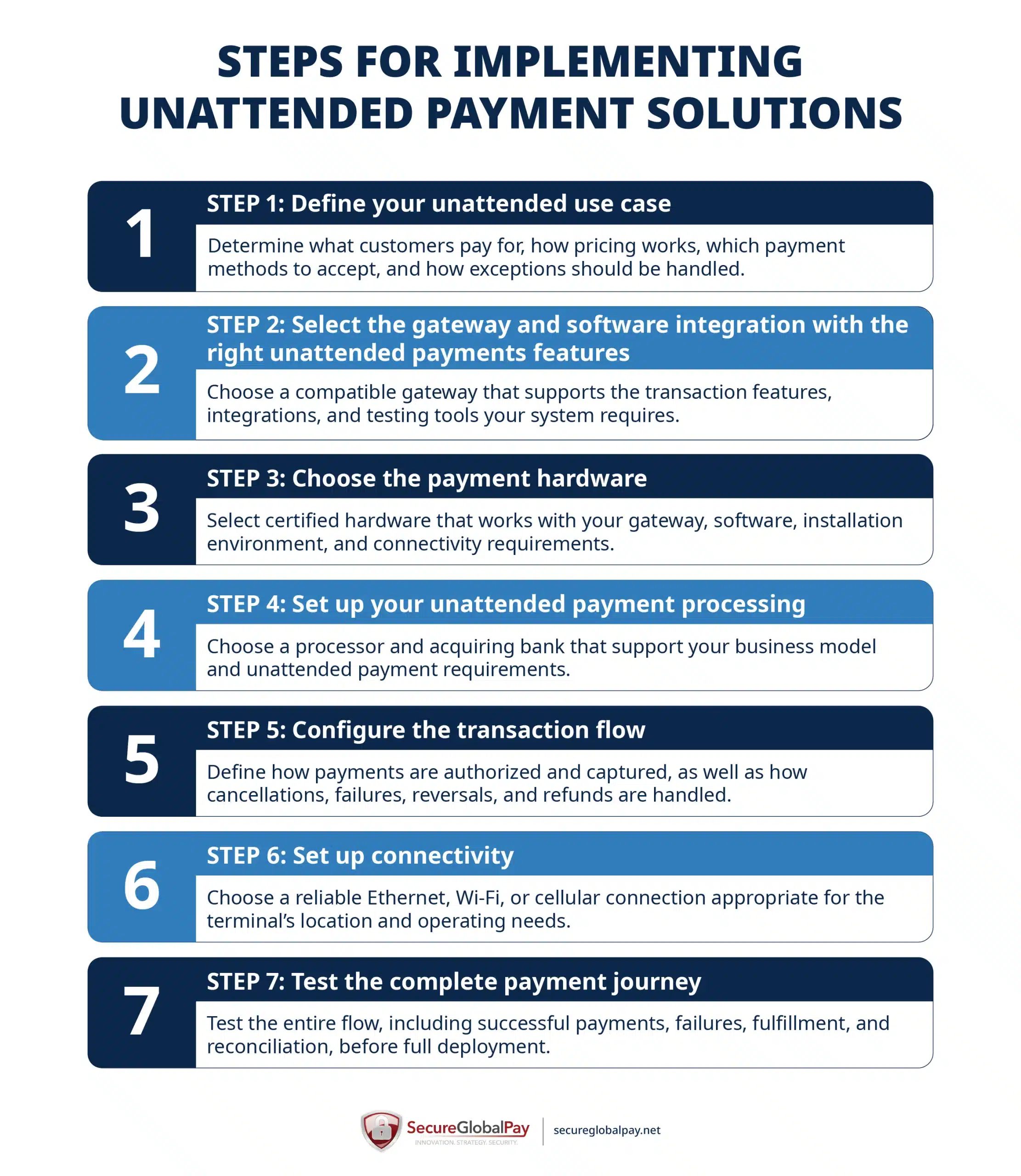
Implementing unattended payments starts with defining how customers will pay. From there, you can choose hardware, processing, gateway technology, connectivity, and software that fit that specific payment flow.
1. Define your unattended use case
Before choosing a terminal or payment provider, define exactly what the unattended system needs to sell and how customers will interact with it. These decisions determine which payment methods, hardware, transaction types, and integrations you will need later.
At minimum, define:
- What customers are paying for: Define exactly what you are selling — specific physical products, access, parking time, charging sessions, tickets, services, or something else.
- Where the terminal will be installed: Determine whether the device will operate indoors or outdoors and whether it will face weather, temperature changes, dust, moisture, heavy use, or a higher risk of vandalism.
- How will the final price be calculated: Decide whether transactions use a fixed price, customer-selected amount, metered usage, time-based pricing, or another variable-pricing model.
- Which payment methods you want to accept: Consider whether customers should be able to use contactless cards, chip cards, mobile wallets, PIN-based transactions, QR codes, or other payment methods.
- What should happen when something goes wrong: Decide how the system should handle declines, interrupted transactions, failed dispensing, lost connectivity, cancellations, refunds, and other exceptions when no employee is immediately available.
Different unattended applications can therefore require very different payment setups. The following is an example framework rather than a universal requirement:
| USE CASE | WHAT CUSTOMERS PAY FOR | PRICING MODEL | KEY CONSIDERATIONS |
|---|---|---|---|
| Vending machine | A selected product | Usually fixed price | Fast contactless payments, small transaction amounts, reliable machine-to-terminal communication |
| Parking kiosk | Parking time or parking session | Fixed, time-based, or calculated | Outdoor hardware, variable amounts, ticketing or parking-system integration |
| EV charger | Charging session | Usually usage- or time-based | Preauthorization, variable final amount, outdoor operation, charger-software integration |
| Self-service checkout | Multiple products in a basket | Variable basket total | Larger screens, multiple payment methods, retail/POS integration, handling declined or canceled purchases |
The goal is to create a clear set of requirements before you start shopping for technology. It makes choosing compatible hardware much easier.
2. Select the gateway and software integration with the right unattended payments features
If you already own unattended payment hardware, you will want a gateway that integrates with it without too much hassle.
Payment gateways can be integrated through SDKs, leverage an API, use terminal or machine protocols, or rely on middleware.
You should also check whether the gateway and integration support the transaction functions your unattended use case requires, including:
- Authorization and capture: Determine whether you can charge immediately or authorize an amount first and capture the final amount later.
- Voids and reversals: Your system should be able to cancel or reverse an authorization when a transaction cannot be completed, such as when a vending machine accepts payment but cannot dispense the selected item.
- Refunds: Make sure operators can refund transactions remotely when a customer cannot resolve the problem at the machine.
- Transaction status and error handling: Your software needs clear responses for approvals, declines, communication failures, and other errors so it can decide what to display to the customer and whether the product or service should be provided.
- Testing tools: Look for sandbox environments, test cards or simulators, sample applications, and documentation that allow developers to test transaction flows before deploying live equipment.
If you decide to use SecureGlobalPay’s gateway, we will help you evaluate the payment hardware alongside the gateway and processing requirements.
3. Choose the payment hardware
Confirm compatibility before purchasing hardware in volume. Ask your gateway or processor which unattended terminals are already supported and certified for your intended integration. Choosing from an existing supported device list can be much easier than buying a terminal first and trying to make the payment infrastructure work around it later.
When comparing terminals, outside the basics like supported payment methods, indoor vs outdoor use, power source and connectivity requirements, and screen and PIN pad options, pay closer attention to:
- Form factor and mounting: Check the terminal’s dimensions, mounting requirements, cable placement, and physical interface with your existing machine. A terminal designed for a vending-machine cutout may not fit an existing parking kiosk or charger enclosure without modification.
- Software compatibility: Hardware selection and software integration should be evaluated together.
- Security and certification: Verify that the device meets the security and payment certifications required by your processor, acquiring bank, and target markets. The PCI Security Standards Council specifically includes Unattended Payment Terminals within its PIN Transaction Security Point of Interaction standard.
- Remote maintenance and updates: For large unattended fleets, find out how terminals receive firmware, configuration, and security updates and whether devices can be diagnosed or managed remotely.
4. Set up your unattended payment processing
Not every bank or processor is equally comfortable with every business model. Your industry, transaction amounts, expected volume, processing history, and overall risk profile can all affect underwriting and account approval.
SecureGlobalPay works with numerous acquiring banks and helps match merchants with an acquiring partner suited to their business and processing requirements. We can also provide you with a payment gateway and integration support.
This makes it easier to coordinate acquiring, gateway configuration, integration, and terminal compatibility. It simplifies your whole unattended payment setup.
5. Configure the transaction flow
Once the terminal and gateway integration are in place, define exactly when money should be authorized, captured, reversed, or refunded.
Common transaction flows include:
- Charge the full amount immediately: Use a standard sale when the final price is known before payment. This is common for vending machines, ticket kiosks, and other fixed-price purchases.
- Preauthorize an estimated amount: Place an authorization hold before the service begins when the final amount is not yet known. Fuel pumps, EV chargers, and some parking systems may use this approach.
- Capture the final amount later: Once the service ends and the final price is calculated, capture the actual amount against the earlier authorization rather than charging a second unrelated transaction.
- Reverse unused authorizations: If the customer cancels, the equipment fails, or the service never starts, your system should be able to reverse or release the authorization when appropriate.
- Handle failed fulfillment: Define what happens if payment succeeds but the machine cannot dispense the product, open the gate, start charging, or provide the service. Depending on the situation, the system may automatically void or reverse the transaction, flag it for review, or trigger a refund.
- Support remote refunds: Give authorized staff a way to locate a transaction and issue a refund without physically visiting the terminal.
The goal is to account for both the normal payment journey and the exceptions. Document what should happen after an approval, decline, timeout, cancellation, equipment failure, or interrupted connection. The goal is to have a payment system and machine software that respond consistently without requiring an employee to intervene.
6. Set up connectivity
Even though payment transactions do not typically require large amounts of bandwidth, unattended payment terminals need a reliable network connection to send authorization requests, receive responses, and communicate with the gateway or processor.
Common options include Ethernet, Wi-Fi, and cellular connectivity, with the best choice depending on the installation environment.
Consider the following when planning connectivity:
| CONNECTIVITY OPTIONS | BEST SUITED FOR | ADVANTAGES | LIMITATIONS |
|---|---|---|---|
| Ethernet | Fixed indoor installations with available network cabling | Provides a strong, stable connection | Requires network cabling; may be difficult to install in remote or changing locations |
| Wi-Fi | Locations with a reliable existing wireless network | Can be deployed without dedicated cabling; works well for many indoor installations | Signal strength, interference, network security, and credential changes can affect reliability |
| Cellular | Outdoor, remote, or distributed terminals | Does not require local internet infrastructure and can support flexible deployments | Coverage, signal strength, data plans, and carrier availability should be evaluated at each site |
| Primary and backup connections | Higher-priority locations where downtime is costly | Allows the terminal to switch to a secondary connection when the main network fails | Requires compatible hardware and additional configuration; incurs additional costs |
Be careful with offline payment acceptance. Approving transactions without real-time authorization can increase fraud and decline risk. Any store-and-forward or offline functionality should be configured after a discussion with your processor and acquiring bank.
7. Test the complete payment journey
Before going live, test the entire customer and payment journey, not just whether the terminal can approve a card. Your testing should confirm that the terminal, gateway, processor, machine software, connectivity, and fulfillment logic all respond correctly under both normal and abnormal conditions.
Testing should also cover reconciliation between the payment records and machine records. Each approved transaction should be traceable to the corresponding vending purchase, parking session, etc. Unique transaction IDs and timestamps can make failed or disputed transactions much easier to investigate.
Run these tests in a development or certification environment first, and then perform controlled live transactions before a full deployment.
For larger deployments, consider a phased rollout. You could launch a small number of terminals first, monitor transaction performance and customer issues, fix any problems, and then expand to the remaining locations.
How SecureGlobalPay simplifies accepting unattended card payments
SecureGlobalPay is a merchant services provider that helps businesses set up the acquiring, gateway, and processing infrastructure needed to accept cards and other types of payments.
For unattended environments, depending on your business model and equipment, SecureGlobalPay can help with:
- Merchant account placement: We work with multiple acquiring banks and can help match your unattended business with an acquiring partner that fits your industry, expected volume, average ticket size, and transaction model.
- Modern payment gateway: Get access to technology designed to connect payment devices with the processing infrastructure behind them. Comes with advanced fraud protection, has numerous transaction configuration options, and supports virtually all types of payment methods.
- Unattended terminal support: Pre-built support for a wide variety of payment terminals that simplifies the integration process.
- SDK and API integration options: Developers can use API and SDKs to integrate supported unattended terminals into custom applications.
- Gateway and hardware compatibility guidance: We can help you evaluate and recommend compatible payment software and hardware for your use case.
- Multi-MID and payment management: SecureGlobalPay’s gateway can manage multiple merchant accounts through a single gateway and provides transaction routing, reporting, load balancing, and other processing-management capabilities. Useful for larger operators running multiple locations or merchant accounts.
- Hands-on setup support: Whether it’s choosing hardware, managing your acquiring relationships, or configuring the payment gateway, each merchant gets a dedicated account manager, available via phone or email.
Talk to SecureGlobalPay about the equipment you consider using, the payment flow you need, and where your terminals will operate — and we will help you build a compatible processing setup around those requirements.
Written by Roland G. Szasz - Director of Business Development - 25+ years in payment processing.
Roland has spent nearly three decades helping businesses navigate the complexities of payment processing. He now works closely with high-risk merchants that have been declined or restricted by conventional providers - and shares his experience and best practices on this blog.
FAQs
An unattended terminal is a payment device designed to accept transactions without an employee operating it. It is typically built into or connected to self-service equipment such as vending machines, parking kiosks, EV chargers, ticketing machines, and self-checkout systems.
Depending on the terminal and processing setup, unattended terminals can accept EMV chip cards, contactless credit and debit cards, and mobile wallets such as Apple Pay and Google Pay. Some devices also support PIN debit, magnetic-stripe fallback, or other payment methods, although availability depends on the terminal, gateway, processor, acquiring bank, and region.
An attended POS is operated or supervised by an employee, such as a countertop terminal at a retail checkout, while an unattended POS lets customers complete payment without staff assistance.
There is no single standard processing rate for unattended payments. Your cost depends on factors such as card type, transaction volume, average ticket size, industry, processor, acquiring bank, and pricing model; you may also pay gateway, connectivity, and terminal-related fees.
As a general point of comparison, Stripe currently charges 2.7% + $0.05 for domestic U.S. card-present Terminal transactions, while dedicated merchant accounts may instead use interchange-plus or negotiated pricing.
Yes, in many cases you can retrofit an existing vending machine, kiosk, charger, or other self-service system with an unattended payment terminal. The main requirement is compatibility between the terminal, machine controller or software, gateway, and processor.
In certain situations, an existing account can support unattended payments, provided your processor and acquiring bank approve the transaction type and your equipment is properly integrated. Since unattended payments may involve different requirements, such as preauthorizations, delayed captures, or higher fraud risk, your provider will need to review or update your account.
SecureGlobalPay can help confirm whether your existing merchant account is suitable or whether a separate arrangement is required.

Tailored payment solutions for high-risk merchants
- Domestic and offshore accounts
- Competitive, interchange plus pricing
- No long-term contracts or hidden fees
- Built in fraud protection
- Dedicated account manager; 24/7
Sign up in 5 minutes

A+ Rating
as of 06/17/26