


Home » How to Integrate an Online Payment Gateway with Your Website or Platform

How to Integrate an Online Payment Gateway with Your Website or Platform
| May 27, 2026
Depending on how and where you sell, integrating a payment gateway can be as simple as installing a plug-in. However, it can also be quite complex, requiring a development team to build a customized payment infrastructure with APIs, SDKs, tokenization systems, and checkout logic.
In this article, we’ll explore the most common payment gateway integration methods, compare their advantages and limitations, and show a step-by-step integration process for three different scenarios — eCommerce platform, website, and custom integration.
QUICK TAKEAWAYS
- The complexity of a payment gateway integration ranges from installing a plug-in to developing a fully customized integration from scratch.
- Many growing businesses use several integration methods to support different sales channels.
- Choosing a payment gateway with flexible integration options can help your payment infrastructure scale as your business grows.
- SecureGlobalPay provides a state-of-the-art payment gateway that supports a wide range of integration methods through pre-built plug-ins and an open API.
What is a payment gateway integration?
A payment gateway integration is the process of connecting a payment gateway to your website, eCommerce store, app, subscription platform, or POS system so you can securely accept and process online payments.
The payment gateway acts as the technology layer between your business, your customer, and the financial institutions involved in the transaction. When a customer enters their payment details at checkout, the gateway securely encrypts the information, sends it for authorization, and helps complete the transaction in real time.
In simple terms, payment gateway integrations enable customers to pay online using credit cards, debit cards, digital wallets, and other payment methods.
Common types of payment gateway integration
There is no single “best” way to integrate a payment gateway. The right approach depends on how your business accepts payments, the level of customization you need, and the resources you have available.
Many growing merchants use a hybrid integration strategy. It sounds fancy, but it just means that they combine multiple integration types across different sales channels. For example:
- A plug-in integration for its WooCommerce store.
- A mobile SDK for its app.
- A hosted payment page for invoices.
- A direct API integration for recurring billing.
Many merchants will start with native integrations and later move toward more advanced custom integrations as their business grows and payment requirements become more complex.
That’s why it’s important to choose a payment gateway that supports many (if not all) of the integration types we discuss below.
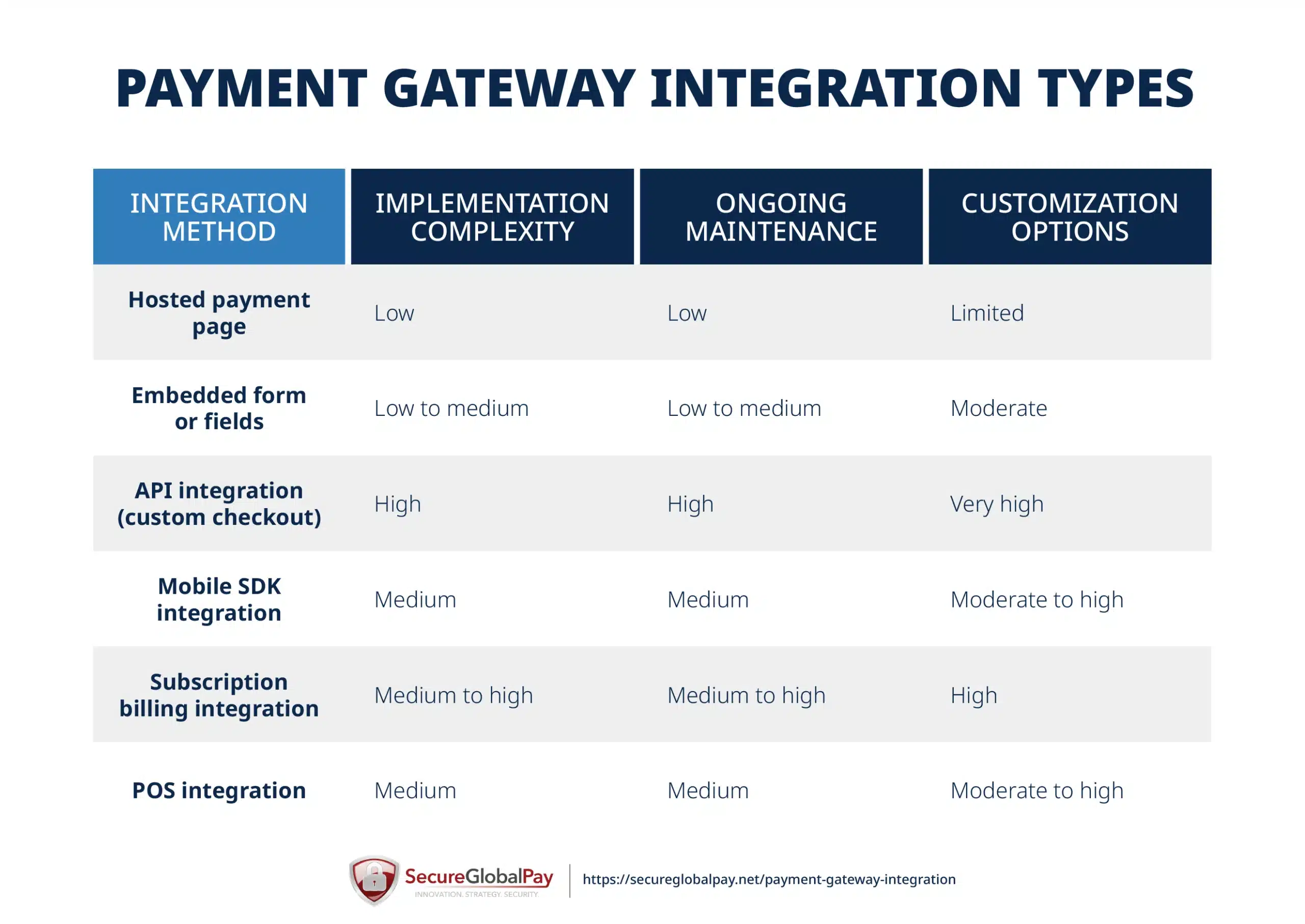
1. Hosted payment page integration
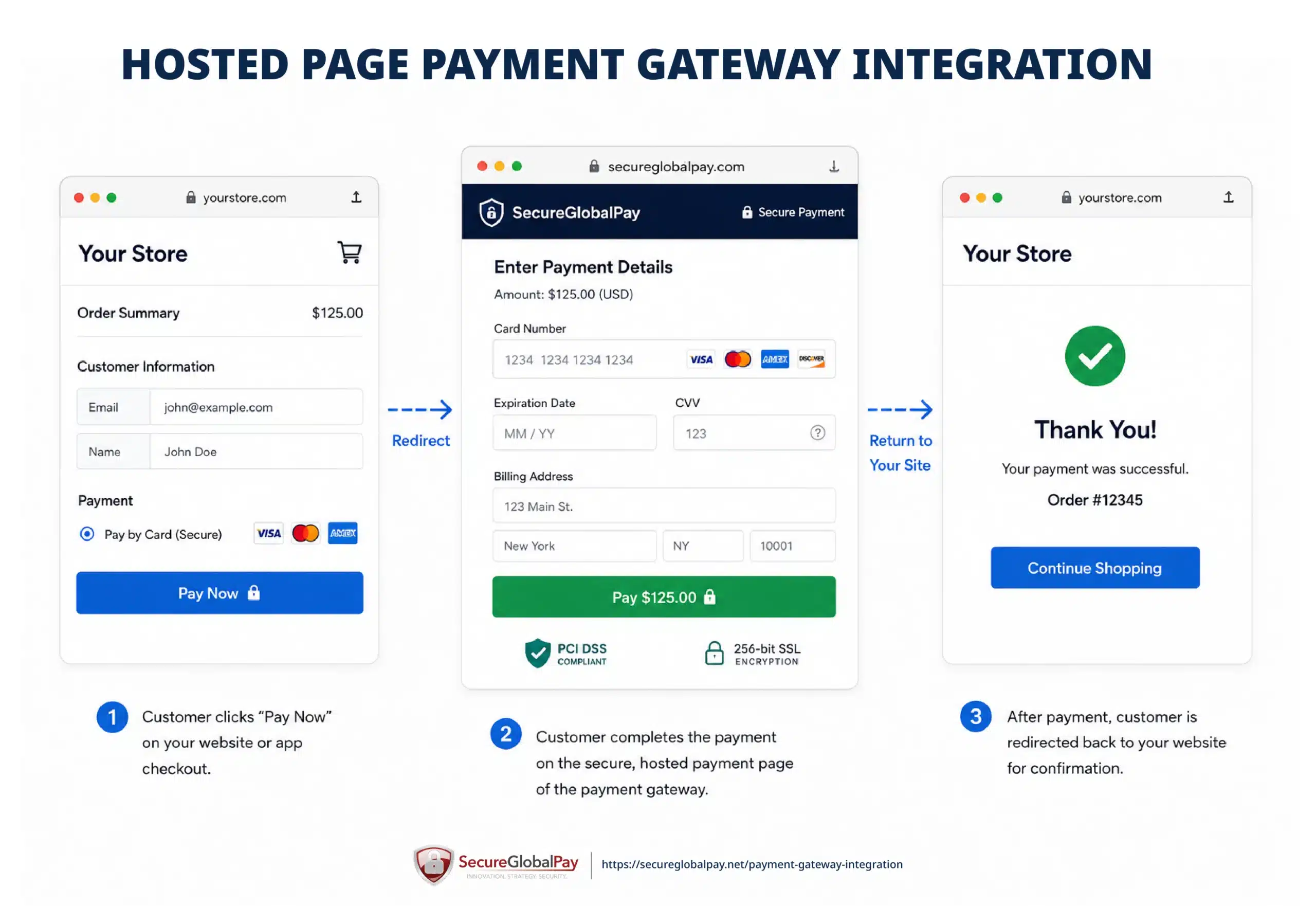
A hosted payment page integration redirects customers from your website or app to a secure payment page hosted by the payment gateway provider.
Instead of collecting and processing payment data directly on your own servers, the gateway provider handles the checkout environment and security requirements for you. After the payment is completed, the customer is redirected back to your website or confirmation page.
Pros:
- Very easy and fast to implement.
- Lower PCI compliance burden for merchants.
- Built-in payment security handled by the gateway provider.
- Works well for businesses without developers and with limited technical resources.
- Often supports multiple payment methods out of the box.
Cons:
- Less control over the checkout experience and branding.
- Customers are redirected away from your website.
- Limited checkout customization options.
- Can create additional friction during checkout.
- Some gateways offer fewer advanced features with hosted pages.
Best for: Hosted payment pages are best for small businesses, startups, and merchants that want a simple way to start accepting payments online without building a custom checkout.
2. Embedded form or fields integration
An embedded form or fields integration lets customers enter their payment details directly on your website or app, without being redirected to a separate hosted payment page. The payment fields are usually provided by the gateway and embedded into your checkout page (via iFrames and JavaScript), while sensitive card data is securely captured and transmitted by the gateway.
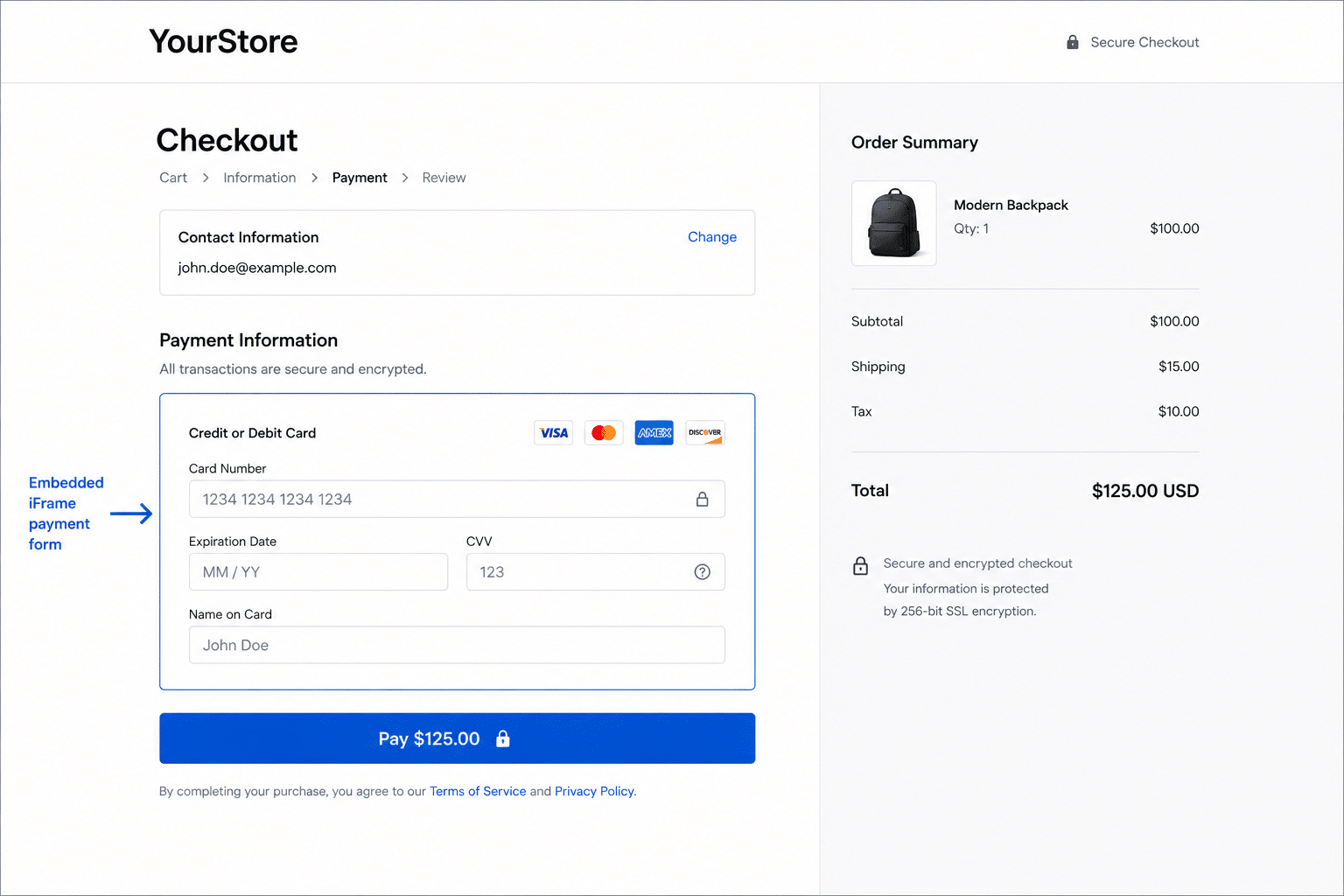
An example of a payment gateway integration through an embedded form.
This gives merchants more control over the checkout experience while still reducing some of the security responsibilities that come with handling payment data directly.
Pros:
- Keeps customers on your website during checkout, reducing potential friction that comes with redirects.
- The sensitive fields are technically controlled by the gateway provider, simplifying compliance.
- Merchants have more control over the checkout experience.
- Much easier to implement than a fully custom API checkout.
Cons:
- Requires a bit more setup than a hosted payment page.
- May need developer support to customize the checkout.
- Design and technical flexibility may be limited by the gateway’s tools and embedded field options.
Best for: Embedded forms or fields are best for merchants that want a more seamless and branded checkout experience without the complexity and responsibility of handling sensitive payment data.
3. Direct API integration (custom checkout)
A direct API integration gives merchants full control over the payment experience by connecting their website, app, or platform directly to the payment gateway’s APIs. Businesses build their own custom checkout flow and manage how payment forms, transaction logic, subscriptions, and user experiences work.
In this setup, the payment gateway provides APIs, developer documentation, SDKs, and authentication tools that allow developers to build a secure payment process inside a fully customized environment.
This is the most flexible type of payment gateway integration, but also the most technically demanding.
Pros:
- Full control over the checkout and user experience.
- Ability to highly customize payment flows and business logic.
- Supports advanced features and automation.
- Allows deeper integration with internal systems and workflows.
Cons:
- Requires experienced developers and ongoing maintenance.
- Can be quite complex and time-consuming to build and maintain.
- Merchant takes on higher PCI compliance and security responsibilities.
- API changes and updates must be actively managed.
Best for: SaaS platforms, marketplaces, subscription businesses, and enterprise merchants that want full control over checkout flows, payment routing, user onboarding, recurring billing, and backend automation.
4. Mobile SDK integration
A mobile SDK integration allows businesses to accept payments directly inside a mobile app using software development kits (SDKs) given by the payment gateway provider. Instead of building payment functionality from scratch, developers can use pre-built mobile tools and components for iOS and Android apps.
These SDKs typically include secure payment forms, tokenization, wallet integrations, authentication tools, and support for mobile-friendly payment methods such as Apple Pay and Google Pay.
Pros:
- Optimized checkout experience for mobile users, with support for mobile wallets.
- Faster implementation compared to building native payment flows from scratch.
- Built-in security and tokenization features.
- Can help improve mobile conversion rates.
Cons
- Requires mobile app development resources.
- Separate implementation may be needed for iOS and Android.
- There can be various customization limitations, depending on the capabilities of your chosen payment gateway.
- SDK updates and compatibility issues between devices or app versions require technical resources for ongoing troubleshooting and maintenance.
Best for: Mobile SDK integrations are best for businesses that accept payments through mobile applications and want to create a smooth in-app checkout experience. Think delivery apps, ride-sharing platforms, subscription apps, booking platforms, and other mobile-first businesses.
5. Subscription billing integration
A subscription billing integration allows businesses to automatically charge customers on a recurring basis for products or services. Instead of customers manually entering payment information for every transaction, the payment gateway securely stores payment credentials using tokenization and processes recurring payments according to a billing schedule.
Many payment gateways, including SecureGlobalPay, offer built-in subscription management tools or APIs that support recurring payments, free trials, usage-based billing, invoicing, account updates, and workflows for failed payment recovery.
Pros:
- Automates and simplifies recurring billing for both merchants and customers.
- Supports subscription plans, trials, and recurring invoices.
- Reduces manual payment management
- Can include tools for failed payment recovery and account updater services (automatically updating expired or replaced card details).
Cons:
- Requires careful handling of subscription logic and billing cycles.
- Failed payments and churn management can become complex.
- May require deeper API integrations for advanced billing models.
- Compliance requirements can increase for stored payment credentials.
- Subscription migrations between payment processors can be challenging.
Best for: Subscription billing integrations are popular among SaaS companies, membership businesses, subscription box services, streaming platforms, online education providers — basically any business that relies on recurring payments.
6. POS payment integration
A POS (point-of-sale) payment integration connects your payment gateway to card terminals, retail POS software, kiosks, or mobile payment devices. This allows businesses to accept card-present payments while keeping transaction data synchronized across online and offline sales channels.
Modern POS integrations often support omnichannel payment experiences, meaning customer payment data, reporting, inventory, subscriptions, and order information can be connected across physical stores, websites, and mobile apps.
Depending on the provider, POS integrations may include physical hardware, cloud-based software, mobile card readers, and APIs for custom retail or service applications.
Pros:
- Combines online and in-person payment processing.
- Centralizes reporting and transaction management.
- Can integrate with inventory, CRM, and loyalty systems.
- Depending on the merchant services provider, supports modern payment methods like tap-to-pay and mobile wallets.
Cons:
- May require specialized hardware and setup.
- Hardware and software compatibility can vary.
- Internet or device issues can interrupt payments.
- Some integrations require ongoing maintenance and updates.
- Costs can increase with multiple locations or terminals.
Best for: Businesses that accept payments both online and in person. This includes retail stores, restaurants, service businesses, medical practices, event businesses, and omnichannel merchants that want to unify their payment operations across physical and digital sales channels.
Online payment gateway integration process
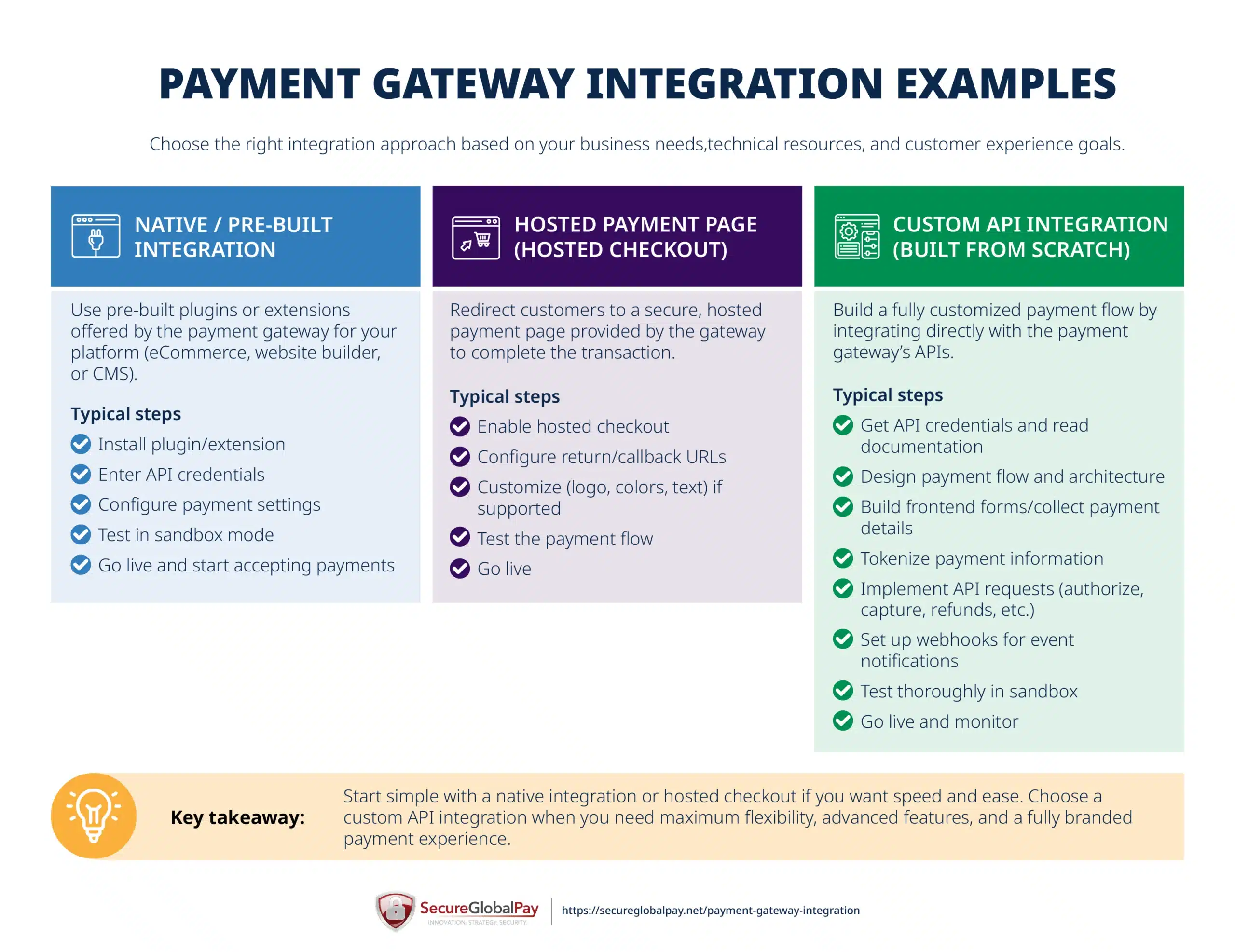
Before integrating a payment gateway, merchants typically need a few things in place. This usually includes an approved retail or high-risk merchant account, access to the payment gateway dashboard, and API credentials or authentication keys.
E-commerce payment gateway integration
Most e-commerce payment gateway integrations are completed using either a pre-built plug-in or a direct API connection.
SecureGlobalPay’s payment gateway integrates with all of the popular eCommerce platforms like WooCommerce, Shopify, Magento, and BigCommerce to simplify the process and reduce development work.
To illustrate the simplicity of this type of integration, below are the actual steps WooCommerce merchants use to integrate their store with our payment gateway:
- Download the plug-in from our website.
- Log in to WordPress.
- Upload, install, and activate the plug-in.
- Go to the “Payment tab” in “WooCommerce Settings” to enable payment types (you can choose credit card, eCheck option, or both).
- Finally, enter the provided Merchant API Key and save changes.
It’s a super simple process that takes less than 20 minutes. When done, we always recommend opening the checkout page, as well as running a few test transactions to confirm everything is working properly.
For a more detailed breakdown of each step with accompanying screenshots, check out our instructions page.
Connecting the payment gateway to your website checkout
If your payment gateway already supports your website platform or checkout solution, the process is very similar to what we described above.
The exact steps will vary depending on your website builder, shopping cart, or checkout software, but the overall process is fairly similar across platforms:
- Verify your merchant account with the payment gateway provider (you can typically skip this step if you have the gateway and merchant account from the same provider).
- Obtain your API keys, merchant ID, or authentication credentials.
- Install the gateway plug-in, extension, or integration module.
- Connect the payment gateway to your website checkout settings.
- Configure accepted payment methods and currencies.
- Customize checkout settings and branding where supported.
- Enable fraud prevention and security settings.
- Test transactions using sandbox or test mode.
- Verify payment confirmations, refunds, and customer notifications.
- Switch the integration to live mode and begin processing payments.
For reference, our payment gateway supports over 120 different website builders and shopping carts. See the full list of integrations here.
While smaller merchants might be satisfied with an out-of-the-box setup, businesses with custom checkout requirements may still need developer assistance to enable advanced features, custom workflows, or additional API connections.
Building a custom gateway integration using API
Businesses that need a fully customized payment experience often build direct integrations with a payment gateway’s APIs.
For example, platforms like Uber, OnlyFans, or pool cleaning service software may need to handle complex workflows such as multi-user payments, recurring billing, saved payment methods, split payments, payouts, or automated invoicing. So they need to hire developers to build and manage the payment flow directly inside the application.
Below is a simplified representation of a custom payment gateway API integration process:
- Create and approve your merchant account and payment gateway account.
- Obtain API credentials, authentication keys, and developer documentation.
- Choose the payment flow and integration architecture.
- Build frontend payment forms or checkout components.
- Implement tokenization to securely handle payment data.
- Connect backend systems to payment APIs.
- Configure transaction processing, payment authorization, and capture logic.
- Implement recurring billing or subscription workflows if needed.
- Set up webhooks for payment status updates and notifications.
- Integrate fraud prevention and risk management tools.
- Test the integration extensively in sandbox mode.
- Validate PCI compliance and payment security requirements.
- Deploy the integration to production and monitor performance.
Custom integrations provide the highest level of flexibility and scalability, but they also require ongoing development, maintenance, security management, and API monitoring.
To simplify the integration process, SecureGlobalPay can provide detailed API documentation and hands-on developer support for your technical team.
If you’re currently developing a new software solution, check out our SaaS payment processing partnerships for integrated payments. We can set you up as an affiliate, with a very competitive buy rate for each merchant you refer to us. You get residual income for the whole life of the account.
How to make sure your payment gateway integration is secure
Payment security should be a priority, no matter which integration method you choose. Luckily, almost every modern payment gateway provides built-in security tools designed to help merchants process payments safely and remain compliant with industry standards.
Here are a few things to consider for added security:
- Partner only with a trusted provider that offers a PCI-compliant payment gateway.
- Use tokenization instead of storing raw card data.
- Enable fraud prevention and risk monitoring tools.
- Use HTTPS and secure server environments.
- Keep plug-ins, SDKs, and API integrations updated.
- Test payment flows every so often in the sandbox and live environments.
- Restrict access to API credentials and sensitive systems.
- Enable multi-factor authentication for payment dashboards.
- Monitor transaction activity for suspicious behavior.
- Regularly review webhook, refund, and payout configurations.
- When building custom checkouts, work closely with experienced developers.
In general, the simpler your integration method, the less security responsibility falls on your business. However, even merchants using hosted or embedded payment solutions should still test their integrations carefully before going live.
Get your merchant account and payment gateway from SecureGlobalPay
SecureGlobalPay is an all-in-one merchant services provider that specializes in supporting high-risk merchants across a wide range of industries.
This means that we can set you up with domestic and offshore merchant accounts, a powerful payment gateway, and everything in between. This results in faster onboarding, smoother integrations, easier troubleshooting, and better compatibility between payment systems.
Here is just a snapshot of SecureGlobalPay payment gateway features:
- Secure tokenization and PCI-compliant payment processing.
- Support for online, subscription, mobile, and in-person payments.
- Support for a wide range of payment gateway integration types.
- Multi-MID setup support for businesses with complex processing needs.
- Advanced fraud prevention and risk management tools.
- Integrations with 120+ eCommerce platforms and checkout systems, with purpose-built plug-ins for big marketplaces like WooCommerce and Shopify.
- Open API and developer tools for custom integrations.
- Compatibility with invoicing, CRM, and business management software.
- Developer support for custom payment workflows and integrations.
- And more.
Whether you need a simple plug-in integration or a fully customized payment infrastructure, SecureGlobalPay offers flexible integration options and dedicated support to minimize and solve payment processing issues as you scale.
Sign up with SecureGlobalPay today and build a payment setup that fits your business needs.
Written by Roland G. Szasz - Director of Business Development - 25+ years in payment processing.
Roland has spent nearly three decades helping businesses navigate the complexities of payment processing. He now works closely with high-risk merchants that have been declined or restricted by conventional providers - and shares his experience and best practices on this blog.
FAQs
Payment gateway integration is important because it allows businesses to securely accept online payments through their website, app, or eCommerce platform. Without a connected payment gateway, customers would not be able to complete digital transactions at checkout.
A payment gateway integration connects your checkout to the payment gateway provider so that payment information can be securely processed. When a customer submits payment details, the gateway encrypts the data, sends the transaction for authorization, and returns an approval or decline response to your website or app in real time.
Most payment gateways provide a sandbox or test environment that allows merchants to simulate transactions without processing real payments. Before going live, businesses should test successful payments, failed transactions, refunds, recurring billing flows (if applicable), payment notifications, and fraud settings to make sure the checkout experience works correctly across devices and payment methods.
Using a payment gateway API typically involves obtaining API credentials, reviewing the gateway’s developer documentation, and connecting your website or app to the gateway’s endpoints.
Developers use the API to securely process payments, tokenize payment data, manage subscriptions, handle refunds, and automate payment-related workflows inside a custom checkout or application.
Payment gateway integration in OpenCart is usually done by installing a payment extension or module provided by the gateway provider. After installing the module, merchants typically enter their API credentials, configure payment settings inside the OpenCart admin dashboard, test transactions in sandbox mode, and then switch the integration to live mode.
Magento payment gateway integration is commonly completed using a pre-built extension or through direct API integration for more advanced setups. Merchants usually install the gateway extension, connect API credentials, configure checkout and fraud settings, test the integration, and enable the gateway for live transactions once everything is working properly.
Payment gateway integration in PHP is typically done using the gateway’s API or PHP SDK.
Developers start by creating a secure checkout form where customers can enter their payment information. The PHP backend then sends the payment request to the gateway using API credentials, processes the authorization response, and returns a success or error message to the customer. Many payment gateways also provide pre-built SDKs and sample code to simplify the integration process.
For better security and PCI compliance, merchants should use tokenization or hosted payment fields instead of storing raw card data on their own servers. More advanced PHP integrations may also include recurring billing, subscription management, refunds, webhook notifications, fraud prevention tools, and support for multiple payment methods such as digital wallets or ACH payments.
Payment gateway integration in ASP.NET is commonly completed using the gateway’s API, SDK, or pre-built .NET libraries. Developers connect the payment gateway to their ASP.NET website or application, create secure payment forms or embedded checkout pages, and process transactions through backend API requests. The application then handles payment approvals, declines, receipts, refunds, and transaction updates in real time.
ASP.NET integrations are often used for larger business applications, SaaS platforms, and enterprise systems that require more advanced payment functionality. Depending on the payment gateway, developers may also implement tokenization, recurring billing, customer vaults, webhooks, fraud prevention tools, and custom payment workflows while integrating the payment system with CRMs, invoicing platforms, or internal business software.

Posted in - Credit Card Processing, Payment Gateways
Tailored payment solutions for high-risk merchants
- Domestic and offshore accounts
- Competitive, interchange plus pricing
- No long-term contracts or hidden fees
- Built in fraud protection
- Dedicated account manager; 24/7
Sign up in 5 minutes

A+ Rating
as of 06/17/26